

 The Computer Monkey is an authorized reseller of Malwarebytes Premium. Malwarebytes Premium is an outstanding product for preventing and removing malware infections. Go to the bottom of this page for purchasing information. If you have completed your purchase of malwarebytes, the following instructions show how to change or activate your product using your new license key.
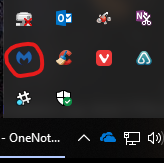
- Open Malwarebytes using the icon on your desktop or in the notifications area of your computer desktop. Or use Finder to locate Malwarebytes on a Mac.
 |
 |
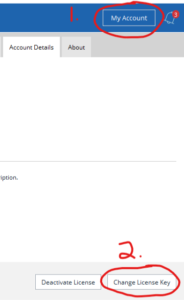
2. Click on “My Account” which will take you to the Account Details tab. Then click “Change License Key”
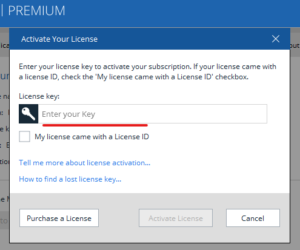
3. Accurately enter your new license key and click “Activate License” and you are finished. You can now close Malwarebytes.
Purchasing Malwarebytes Premium
Customers who purchase Malwarebytes Premium directly from The Computer Monkey, receive free remote support of the product as well, but if you would rather purchase it directly from Malwarebytes a link is available through our resources page.
- Contact Us to purchase Malwarebytes from The Computer Monkey
- Visit our resources page for a link to the Malwarebytes Store


Comments on this entry are closed.
Thank you Diana!